From Solo Operator to Service Team: The Systems to Build Before You Hire
By Adam Turner, Founder, LawnJobOS · 2026-08-30 · 6 min read · Tools
Hiring help is exciting right up until the calendar, customer messages and job details live in three different places. Build the operating structure before the crew starts growing.
Your first employee should join a business, not a scavenger hunt
Going from solo operator to service-business employer feels like a major step because it is one.
Another person can help complete jobs, answer customers, manage part of the schedule or carry some of the daily load that has quietly attached itself to the owner’s spine. The business gains capacity, and the owner may eventually finish a coffee while it is still recognizably coffee.
Hiring, however, does not automatically create leverage.
If the business runs through one person’s memory, text messages, camera roll, paper calendar and collection of mysteriously named phone contacts, the first employee does not enter an operating system. They enter an archaeological dig.
The owner becomes the search engine for the entire company. Where is the address? What did the customer approve? Has the deposit been paid? Which service did they order? Are we supposed to return next Tuesday, or was that the other customer with the cedar hedge?
An employee can provide another set of hands, but only a system gives those hands somewhere useful to work.
Before hiring, build enough structure that a new teammate can understand what needs to happen, find the information required to do it and move the work forward without asking the owner to narrate the business all day.
First, define what you are actually hiring for
Many first hires begin with a broad and highly technical job description: “I need help.”
That feeling may be accurate, but it is not yet a role.
A useful role begins with outcomes. What work should this person take ownership of? Which recurring problems should stop landing on the owner? What decisions can the employee make independently, and which decisions still require approval?
A field employee, crew lead, office coordinator and manager solve different capacity problems. Hiring a generally capable person without defining the gap often produces an expensive shadow who follows the owner around waiting for instructions.
Before posting the position, write down:
The work this person will perform regularly.
The information needed to perform it.
The decisions they can make without approval.
The situations that should be escalated.
The standard that defines a completed job.
The person responsible for reviewing their work.
This does not require a 46-page employee handbook bound in leather. One clear page is more useful than several vague conversations conducted beside a running leaf blower.
The goal is to create a role that can eventually operate, not simply an extra person who remains permanently attached to the owner.
Put the calendar somewhere everyone can find it
A solo operator can survive with an informal calendar because the person creating the schedule is also the person expected to remember it.
A team removes that advantage.
Once several people are involved, job information needs one dependable home. Dates, times, service details, customer communication and changes should not be scattered across personal calendars and separate message threads.
The calendar is not merely a list of appointments. It is the shared operational promise the business has made to its customers.
When that promise lives in multiple places, inconsistencies appear quickly. The owner changes a booking but forgets to update the employee. A customer reschedules through one conversation while the crew is looking at an old screenshot. Someone arrives at the correct address on the wrong Thursday and delivers an extremely punctual apology.
A connected system reduces this uncertainty. The team works from the same current information, approved changes can update the schedule and the business spends less time reconciling competing versions of reality.
Before hiring, decide which calendar is authoritative. If an employee has to ask whether “the real schedule” is in the software, on the wall or inside the owner’s head, the system is not finished.
Give customer conversations a business address
Customers will contact the business before, during and after a job. They may ask a question, submit photos, request a quote, confirm a detail or change something that affects the work.
If those conversations live across the owner’s personal texts, social-media inboxes, email and voicemail, the employee sees only fragments. The owner becomes responsible for manually relaying each useful detail, usually while driving, working or trying to remember which customer owns the nervous golden retriever.
A connected customer record gives the team context.
The objective is not to eliminate every communication channel customers enjoy using. It is to keep important business conversations attached to the customer, booking, quote or service wherever possible. The employee should be able to understand what has already happened without asking the customer to repeat the story or requesting a verbal briefing from the owner.
This protects the customer experience as the team grows. Customers continue dealing with one organized business rather than several people who each know a different third of the situation.
Standardize the journey from inquiry to payment
A solo operator can improvise because the entire process belongs to one person. They know that a particular customer requested a quote through Facebook, approved it by text and plans to pay after the work is complete.
A new employee sees three unrelated facts floating in three different systems.
Before hiring, map the basic customer journey:
How does a customer discover the business?
Where do they explore services and pricing?
How do they ask a question or request a quote?
How is the work approved and scheduled?
Where are job details recorded?
How is completion confirmed?
How and when does payment happen?
What follow-up occurs afterward?
Not every customer will move through the process identically, but the business should have a standard route. Exceptions are manageable when there is a normal path to return to. Without a normal path, every job is an exception wearing work boots.
A connected service-business platform can keep more of that journey together. The public Business Page, customer communication, quotes, bookings, calendar and payment activity do not need to behave like unrelated businesses that happen to share a logo.
This structure makes training easier because the employee learns one operating flow rather than the owner’s accumulated collection of workarounds.
Create individual access before handing over your login
The owner’s login should not become the unofficial welcome package.
Every teammate should have an individual account, and their access should reflect the responsibilities of their role. A field employee, crew lead and manager may all require different levels of visibility and control.
Permission-based access gives the team enough room to work without giving every new employee ownership-level authority. It also allows roles to change as responsibilities evolve.
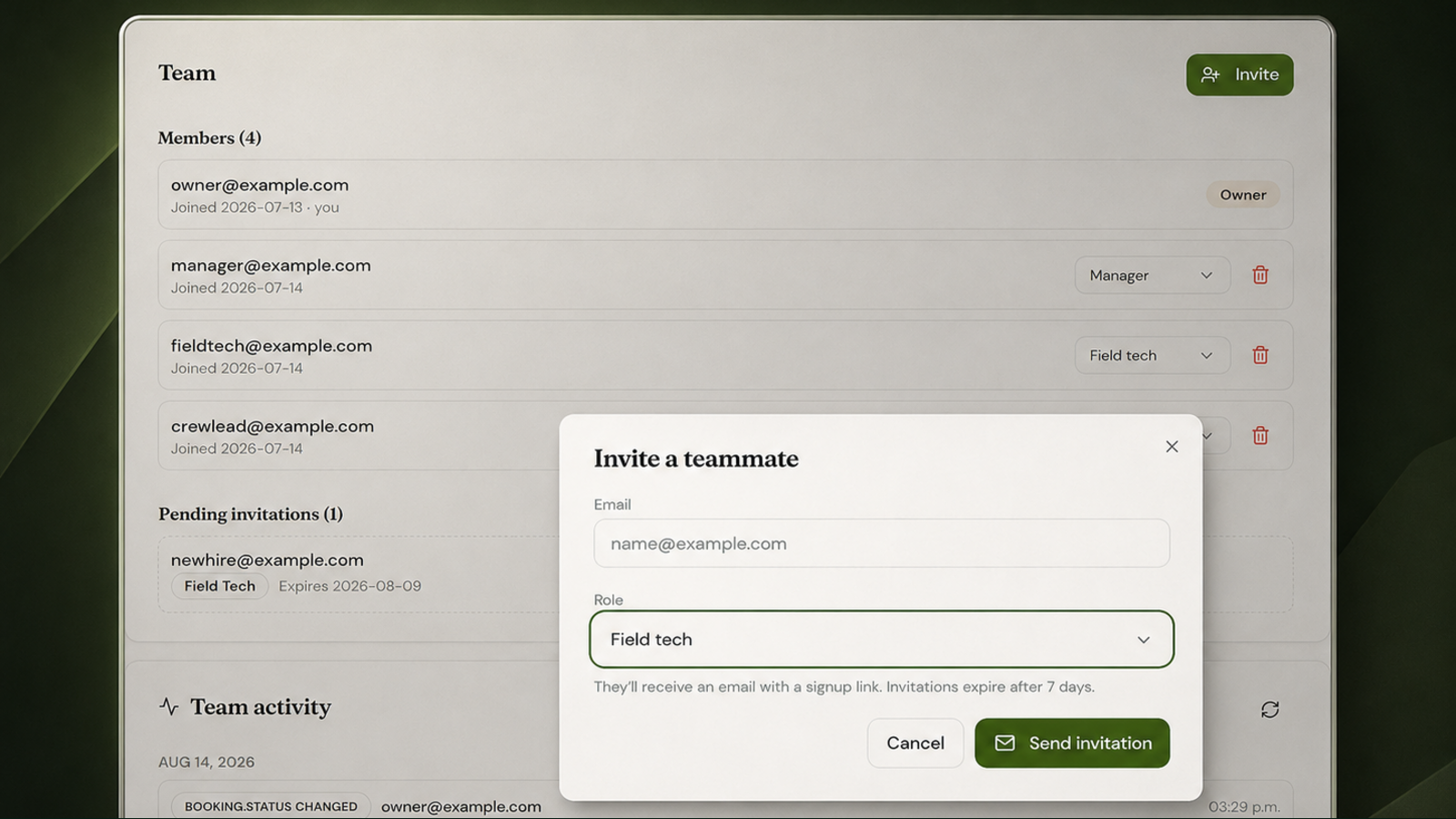
In LawnJobOS, owners can invite teammates individually by email, assign different levels of permission-based access, review pending invitations and maintain a history of important team activity. Former teammates can be removed without changing the login process for everyone else.
That structure becomes much harder to introduce after a shared password has already spread across several devices. Establish the rule with the first hire: individual people use individual accounts.
The owner’s password stays with the owner. Civilization continues.
Document the recurring work
Owners often believe a process is obvious because they have performed it hundreds of times.
The new employee has performed it zero times.
Document the repeatable parts of the operation before the employee arrives. Start with the activities that affect customers, money, safety or scheduling. These are the areas where improvisation becomes expensive.
Useful documentation may include:
How a new inquiry is handled.
How job details are confirmed.
How arrival or delay information is communicated.
How photos and notes are recorded.
How additional work is approved.
How a job is marked complete.
What happens when a customer is unhappy.
Who can issue a refund, discount or schedule change.
How incidents or damaged equipment are reported.
Keep each process short enough to be used. A checklist visible at the moment of work is more valuable than an impressive operations manual nobody opens after orientation.
Documentation should also evolve. When an employee discovers a clearer way to explain or complete something, improve the process. A system should preserve useful knowledge, not preserve the founder’s first attempt forever because it was typed in bold.
Build the handoff, not just the task
Most operational failures happen between tasks.
The quote was approved, but nobody scheduled the job. The employee completed the work, but nobody updated the customer. A message arrived, but the person who read it assumed someone else would respond.
These failures are not caused by difficult work. They are caused by unclear handoffs.
For each important stage, identify:
Who owns it now?
What tells them it is ready?
What must be completed before it moves forward?
Who owns the next step?
Where is the handoff recorded?
A good handoff leaves evidence. The next person should not need to overhear a conversation, inspect the owner’s expression or rely on telepathy.
This becomes particularly important when the owner is no longer present for every job. The system must carry the context that the owner previously supplied in person.
Prepare for offboarding before onboarding
Nobody enjoys discussing an employee’s eventual departure before the employee has started, but it is considerably more enjoyable than discovering six months later that a former teammate can still access the business.
Create a basic offboarding checklist while building the onboarding process:
Remove access to business systems.
Recover company equipment and physical keys.
Redirect active customer responsibilities.
Review unfinished jobs or conversations.
Preserve required employment and payroll records.
Confirm final payroll obligations.
Tell the remaining team who now owns the departing person’s work.
Employment and payroll requirements vary by location and worker classification. Canadian employers should review current Canada Revenue Agency requirements, while U.S. employers should consult the IRS, SBA and relevant state agencies. Use an accountant, payroll professional or employment lawyer when the correct treatment is unclear.
The software can organize operational access. It cannot make an incorrect worker classification correct through an especially attractive dropdown.
Hire into the business you want to become
The right time to build these systems is before the new employee needs them.
That does not mean waiting until every process is perfect. Perfection is often procrastination with nicer stationery. Build the minimum structure required for another person to enter the operation confidently:
One connected customer journey.
One dependable calendar.
One place for important customer context.
One defined role with clear responsibility.
One individual login with appropriate access.
One repeatable onboarding and offboarding process.
One visible record of important team activity.
LawnJobOS brings the customer-facing and operational sides of a service business into one connected platform. Team Management & Staff Access extends that system beyond the owner, allowing each teammate to have a place in the business without receiving control of the entire business.
The first hire should create capacity. The second should create more. By the time the crew grows beyond that, the company should not require the founder to personally explain every customer, every job and every Tuesday.
Build the operating structure first. Then invite the team into something worth scaling.
Sources
U.S. Small Business Administration — Manage Your Business
https://www.sba.gov/counseling/manage-your-business/
Internal Revenue Service — Hiring Employees
https://www.irs.gov/businesses/small-businesses-self-employed/hiring-employees
Canada Revenue Agency — Set Up and Manage Employee Payroll Information
https://www.canada.ca/en/revenue-agency/services/tax/businesses/topics/payroll/set-up-new-employee.html
Canada Revenue Agency — Determine Whether You Need to Register for a Payroll Account
https://www.canada.ca/en/revenue-agency/services/tax/businesses/topics/payroll/open-manage-payroll-account/determine-need-register.html
About the editor
Adam Turner is the founder of LawnJobOS, a Social Booking Platform built to help service businesses get discovered, get booked and run the operation from one connected place. He writes about practical systems, better customer journeys and the small operational decisions that become surprisingly large problems once a business starts growing.